 KartGarage
Your whole garage, and the right jet for today
Keep every kart, setup, part and maintenance job organized, dial in carburettor jetting from live weather in seconds, and import a session from your lap timer to see where the time actually went.
Free to use · Works offline · No account needed · In nine languages
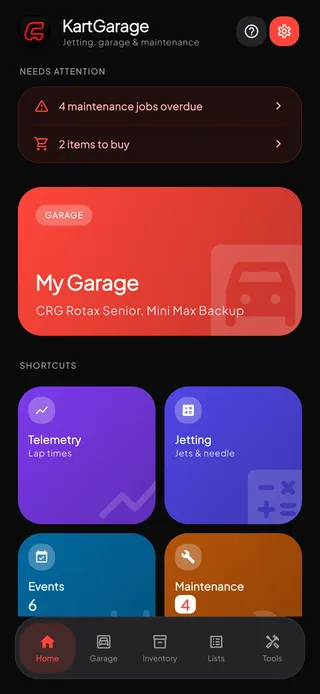
Built for the paddock, not the desk
Everything you need between sessions, on one device, with no signal required.
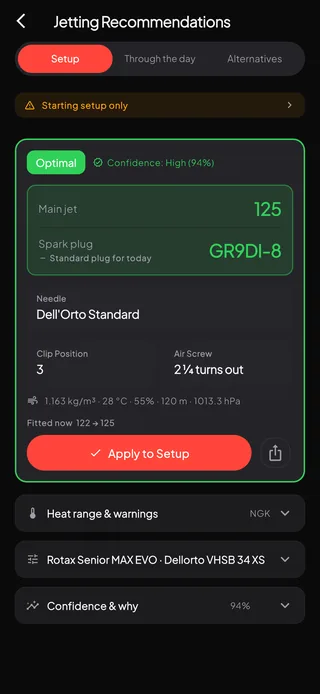
Exact jetting, dialed to today
Main jet, needle, clip, air screw and spark plug heat range — calculated from the conditions at your track, with a confidence score so you know how much to trust it.
- Uses temperature, humidity, pressure and altitude
- Asks whether your pressure is a sea-level figure or a reading at the track — only one of them sets air density
- A spark plug heat range for the same conditions, from your engine's own ladder
- Pull live conditions for your track with one tap — or name a circuit and the hour you will be on track, and get the jetting for there and then
- Richer and leaner alternatives when you want a safety margin
- An hourly forecast showing the exact hour your jet needs to change, with the plug named alongside
- Share the fitment as plain text — engine, carb, jet, plug, needle and clip, with the conditions it was worked out for
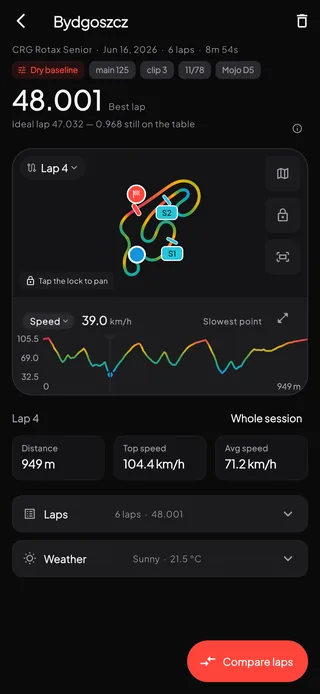
See where the lap time went
Import a session from your lap timer and read it against the setup that was on the kart and the weather it ran in. Telemetry import and lap analysis are part of Pro.
- Reads AiM XRK, Unipro UNI and TSV, RaceBox CSV and GPX
- Every lap timed from GPS, with best lap, consistency, top speed, max RPM and head temp
- Place the start line and the splits on the track map, then read sector times off it
- Compare two laps: the track turns red where the slower one lost time and green where it gained
- Draw speed, RPM, head temp, cornering g, braking g or altitude along the lap
- Save a track once and everything you log there stays comparable
- Speed, distance and altitude follow the units you picked in Settings — mph, feet and miles, or km/h and metres
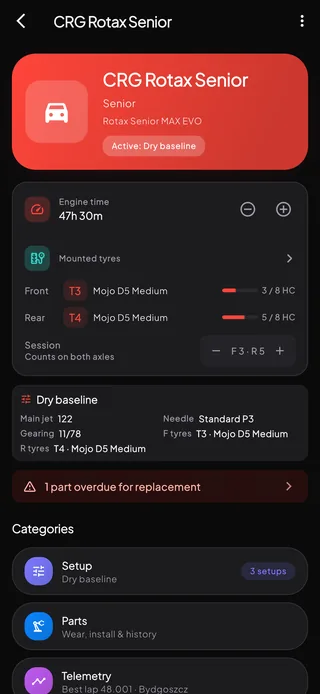
Know every kart in detail
Engine, chassis and category details for each kart, with live status and history at a glance — and photos so they are easy to tell apart.
- Manage multiple karts and switch between them instantly
- See engine time and what is due on each one
- Export a kart as a backup or a readable report, then import it on another device (Pro)
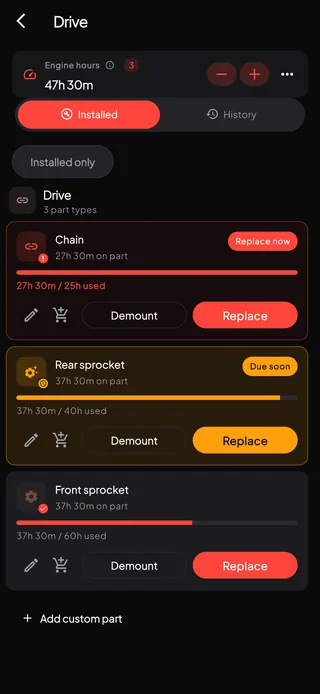
Catch wear before it fails
Track part life by engine hours and keep an inventory of spares, so you know what is fresh before you need it — not after something lets go.
- Part life tracked against real engine time
- An inventory that knows what is in stock, mounted or worn out
- Log tyre sets and keep an eye on their condition
Arrive race-ready
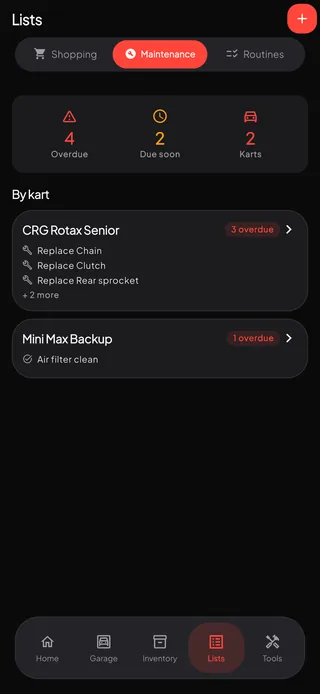
Routines are the checklist your mechanic keeps, grouped by when you do it, and Maintenance is everything the karts are behind on. Both sit under Lists, next to an event plan, a packing checklist built from your own inventory, and a countdown so nothing is left until the morning of.
- Routines grouped by trigger — on arrival, before every session, after a wet session, after the last race — shipped ready to use and yours to rename, reorder and add to
- Each kart keeps its own ticks from the one shared list, and Next session unticks the groups you marked for it
- Everything overdue and coming up, grouped by kart, with the count of jobs each one is behind on
- A cracked side pod or a sheared screw goes down as a one-off repair, with no interval to invent
- Swipe a job to the right to tick it off
- Packing checklists generated from the parts you actually own, and shopping lists per kart so nothing is forgotten
From needed to in stock
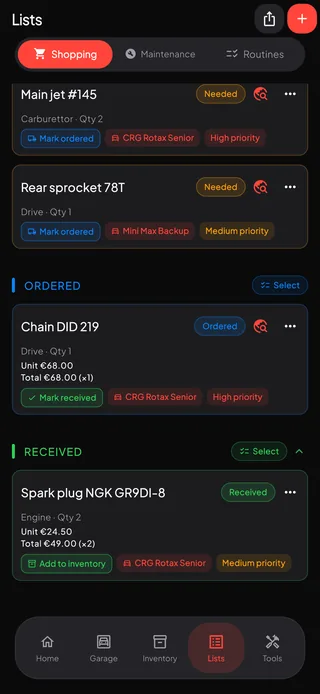
Build a shopping list per kart, send it to whoever is doing the ordering, and file each part into Inventory the day it lands — so Inventory always knows what you actually have.
- Every line has a status — needed, ordered, received — and the free limit counts only what you still have to buy
- A line is received the moment it arrives; adding it to Inventory is a separate step, offered there and then or from the line's menu
- The app finds the part online for you — a web search when you have a part number — and a line can keep the link to the listing you chose
- Unit price and quantity per line, totalled for you
- Share the whole list, or tap Select on a group heading to send only part of it
- Send several ordered lines to Inventory at once from the selection bar
Quick maths for the paddock
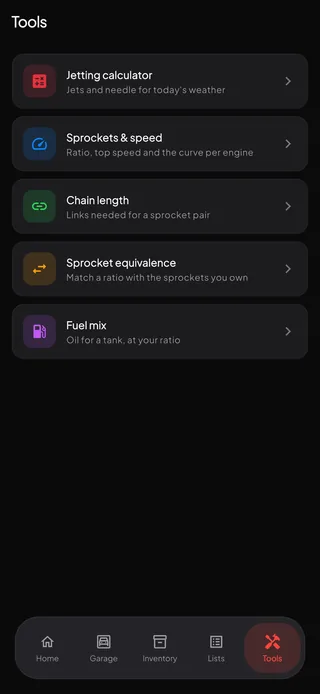
The Tools tab does the arithmetic you would otherwise do on a phone calculator between sessions. Every tool reopens on your last values, and measuring your rear tyre once makes every speed on screen follow the tyre you actually run.
- Sprockets and speed — ratio, rollout, top speed and the curve, per engine
- Chain length — the links a sprocket pair needs at your real centre distance
- Sprocket equivalence — match a ratio using only the sprockets you own
- Fuel mix — oil for a tank at your ratio, from the makers' published figures
And the rest of the weekend
Setups for every condition
Save dry, damp and wet presets, switch the active setup in a single tap, and track how each one performs over time.
Your own service intervals
Set each job to come round by days, by engine hours or by both, and the app works out when it is next due from the running the kart has actually done. An hours-based job names the meter reading it falls due at, and a one-off repair has no interval at all.
Gear homologation
Helmets, suits, gloves, boots and rib protectors with their standard, number and validity dates — warned before anything expires.
Yours, and only yours
Everything lives on your device. No account, no sign-up, no analytics, no tracking, and nothing uploaded to us.
Export and import
Take a kart with you as a backup or a readable report, and bring it back on another device. Kart export is part of Pro.
Speaks your language
English, German, Spanish, French, Italian, Dutch, Polish, Portuguese and Turkish. The app follows your phone, or you can pick a language of your own in Settings.
Jetting through the day
An hourly forecast that names the exact hour your jet needs to change, with the spark plug alongside it, so a long day at the circuit holds no surprises. Part of Pro.
A guide, not a tour
A manual you can reopen and search any time: how the app fits together, step by step for the jobs that cross several screens, and a glossary of the words this app uses in its own way.
Light and dark
Status colours, labels and cards were reworked for daylight, so both themes stay readable in a dim awning and at the circuit in full sun.
Free to use. Pro when you outgrow it.
Start with the free tier and keep it as long as it fits. Pro lifts the limits and unlocks the full garage.
| FreeNo cost, no account | KartGarage ProMonthly or annual subscription | |
|---|---|---|
| Karts | One | Unlimited |
| Jetting calculations | Five a day | Unlimited |
| Setup presets per kart | Three | Unlimited |
| Saved tracks | One | Unlimited |
| Shopping list lines to buy | Twenty | Unlimited |
| Inventory parts | Ten | Unlimited |
| Tyre sets | Ten | Unlimited |
| Routines, race day events, packing checklists and gear homologation | Included | Included |
| Every tool in the Tools tab | Included | Included |
| Works completely offline | Included | Included |
| Telemetry import and lap analysis | Not included | Included |
| Weather for any circuit and hour | Not included | Included |
| The hourly jetting forecast for the day | Not included | Included |
| Before-and-after comparison in setup history | Not included | Included |
| Kart export and import | Not included | Included |
Prices are shown in the app and vary by region. Billed through your Apple Account and renews automatically unless cancelled at least 24 hours before the end of the period. Manage or cancel any time in your Apple Account settings.
Questions, answered
Do I need an account?
No. There is no sign-up and no login. Your data is stored on your device from the moment you open the app.
Is there an Android version?
Almost. It is built, and before Google Play lets us publish it, at least 12 testers have to use it for 14 days in a row. We have room for 20 — become one.
Which languages does it speak?
Nine: English, German, Spanish, French, Italian, Dutch, Polish, Portuguese and Turkish. The app follows your phone's language, and you can pick a different one in Settings at any time.
Does it work without signal at the track?
Yes. Everything works offline. The only feature that needs a connection is fetching weather for a jetting calculation — where you stand, or a circuit and hour you name — which is part of Pro. On any plan you can enter the conditions by hand instead.
How is my location used?
Only when you tap to fetch weather where you stand. The app uses your approximate coordinates to look up current conditions from Open-Meteo and to name the nearby track. It is never tracked in the background, and you can deny or revoke the permission in iOS Settings at any time — searching a circuit by name or dropping a pin on the map needs no location permission at all.
Which lap timers can it import?
AiM XRK, Unipro UNI and TSV, RaceBox CSV, and GPX from anything that writes it. Laps are timed from GPS against a start line you place on the track map yourself, so a session is comparable with every other session you have logged at that circuit. Telemetry import and lap analysis are part of Pro.
What are Routines?
The checklist your mechanic keeps, grouped by when the job is done — on arrival, before every session, after a wet session, after the last race. KartGarage ships one you can use as it is, and every group and check can be renamed, dragged into your order, added to or deleted. Ticks are kept per kart from the one shared list, Next session unticks the groups you marked for it, and the whole list can be sent to whoever is helping you. Routines are free on any plan.
What can the Tools tab work out?
Sprockets and speed — ratio, rollout, top speed and the speed-vs-rear-sprocket curve, per engine. Chain length for a sprocket pair at your real centre distance. Sprocket equivalence, to match a ratio from the sprockets you already own. And fuel mix, for the oil a tank needs at your ratio. Enter your rear rolling circumference once and every speed on screen follows the tyre you actually run.
How does it pick a spark plug?
The jetting result recommends a heat range for the conditions, worked out from the same air density as the jet, so the two can never disagree. Ladders come from the engine maker or the series — Rotax MAX EVO and pre-EVO, IAME X30, Vortex ROK — with Denso's iridium range alongside. Classes with no established figure get no guess rather than a made-up one.
Which engines and carburettors are supported?
KartGarage covers common kart packages including Rotax and ROK classes with Dell'Orto carburettors. Jetting recommendations are a starting point calculated from air density — always check them against your engine builder's guidance.
Can I move my data to a new phone?
Yes. Export a kart as a backup file and import it on the other device — kart export is a Pro feature. You can also export a readable report if you just want a record of a setup.
How do I cancel Pro?
In Settings › your name › Subscriptions on your device. Cancelling stops the renewal; Pro stays active until the end of the period you already paid for.
Get the jet right before the session, not after it
KartGarage is free on the App Store. No account, no tracking, no reason not to try it.
Download for iPhone